How do I link my account and save my progress?
💡 We strongly recommend linking your Field Day account as soon as you start playing to keep your progress safe.
You can link your game to your Google Play Games (Android) or Apple ID (iOS) account.
To link your account, follow the steps below:
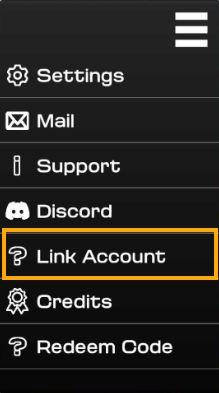
Once linked, your game progress is safe and associated with that Google or Apple account. If you reinstall Field Day or get a new device on the same platform, simply sign in with the same account to pick up where you left off!
Important: Without a linked account, you risk losing access to your progress if you uninstall the game or change devices. Please check: I lost access to my account. How can I recover my progress?
If you need help, just reach out to our Support team via the in-game menu (☰) > Support > Talk with Us. We're happy to help!